LFMVM Mod

Members
Activity Contest

Run engagement contests on your LFMVM viral mailer. Reward your most active members automatically - with full admin control over every point and prize.
Activity Contest Mod for LFMVM
6 AP Earning Actions
6 Reward Types
Contests You Can Run
25 Max Leaderboard Places
Keep members coming back - and competing

The Activity Contest Mod adds a fully automated contest system to your LFMVM site. Members earn Activity Points (AP) for almost everything they do. You decide the contest duration, the rewards, and how many winners.

🏆

Run contests for any duration

A week, a month, three months - set the exact start and end date. The cron handles auto-activation and auto-finalization.

Activity Points for real actions

Members earn AP by logging in, reading mail, sending campaigns, referring members, making purchases, and promoting your site.

🎁

Flexible, stackable rewards

Give winners credits, piggybank cash, commissions, banner impressions, text impressions, and square banner impressions - all in one contest.

📊

Live leaderboard for members

Members see their own rank and AP breakdown in real time. Countdown timer keeps the urgency alive. Gravatars make it personal.

🤖

Fully automated

Daily cron auto-activates scheduled contests, auto-finalizes ended ones, and distributes all rewards without you lifting a finger.

🔧

Nothing hardcoded

Every AP value, reward amount, leaderboard size, contest name and date is set by you in the admin panel. No code editing needed.

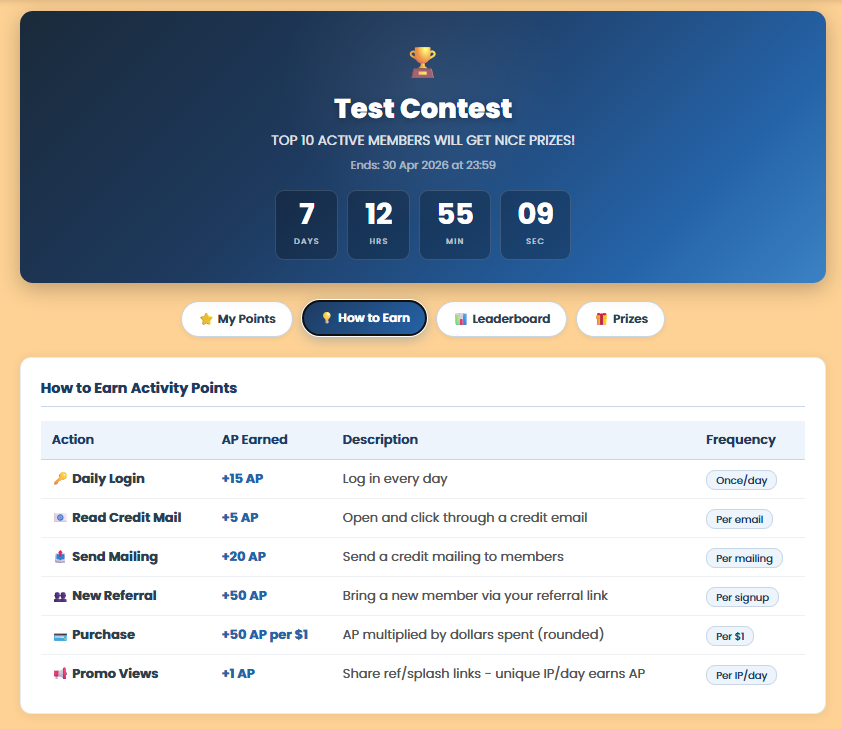
6 ways members can earn AP

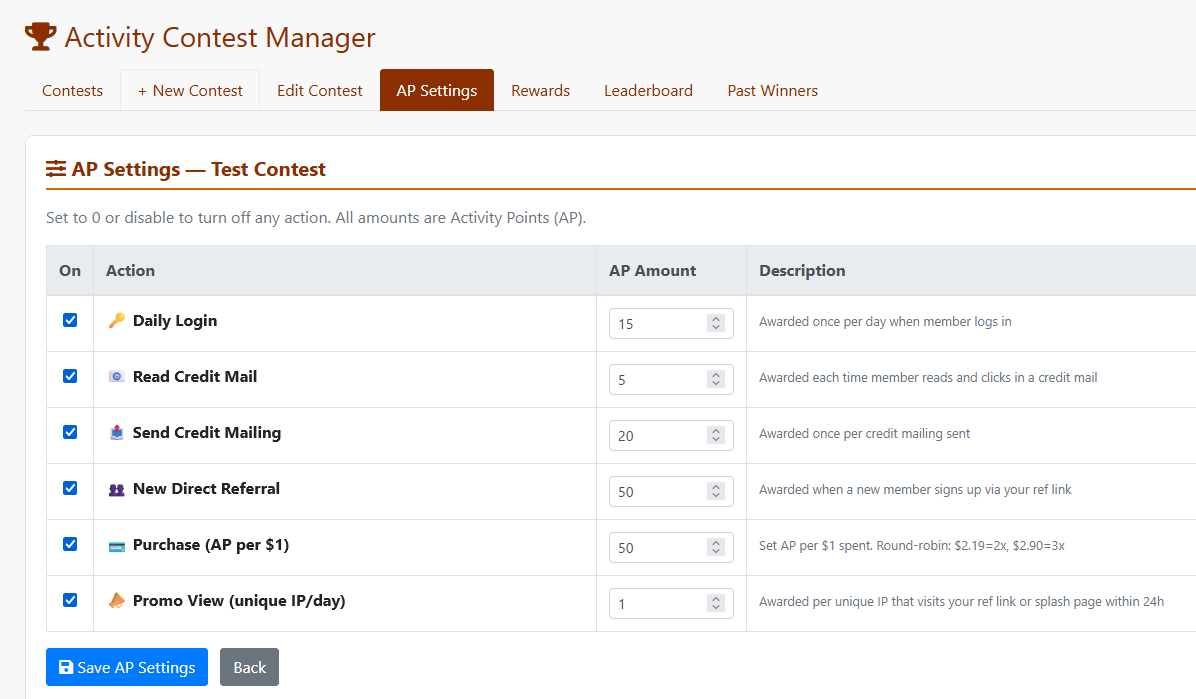
You control which actions are enabled and exactly how many AP each one awards.

  • 🔑
    Daily Login Awarded once per day when the member logs into the site
    Once/day
  • 📧
    Read Credit Mail Awarded each time a member reads and clicks through a credit email
    Per email
  • 📤
    Send Credit Mailing Awarded once per credit mailing sent by the member
    Per mailing
  • 👥
    New Direct Referral Awarded when a new member joins via the member's referral link
    Per signup
  • 💳
    Purchase Set AP per $1 spent. $2.19 = 2×, $2.90 = 3× (rounded to nearest dollar)
    Per $1
  • 📣
    Promo Views Awarded per unique visitor IP/day when someone visits via the member's ref or splash link
    Per IP/day
How to Earn Activity Points - member view

Member view - How to Earn Activity Points

6 reward types - stack as many as you like

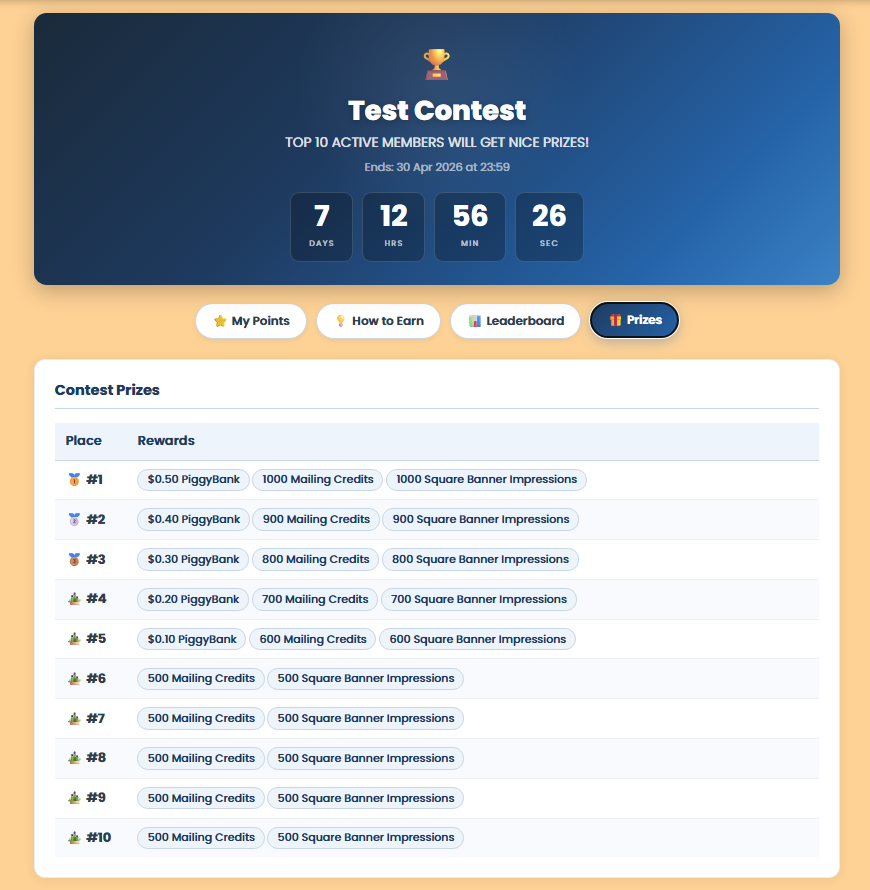
Assign multiple rewards to any winning rank. Top 3 get credits + piggybank cash + banners? Done. You can add as many reward lines per rank as you want.

Mailing Credits
🐷 PiggyBank Cash ($)
💵 Commissions ($)
🖼️ Banner Impressions
📄 Text Ad Impressions
🔲 Square Banner Imps (if plugin installed)

Square Banner Impressions are automatically available if the Square Banner plugin is installed on the site - no configuration needed.

Contest prizes member view

Member view - Contest Prizes tab showing stackable rewards per rank

Complete control. Zero guesswork.

Everything lives under Admin → Ozonic Digital → Activity Contest. Set it up once, let the cron do the rest.

Activity Points Settings admin panel

Admin AP Settings - enable/disable any action and set exact AP amounts per contest

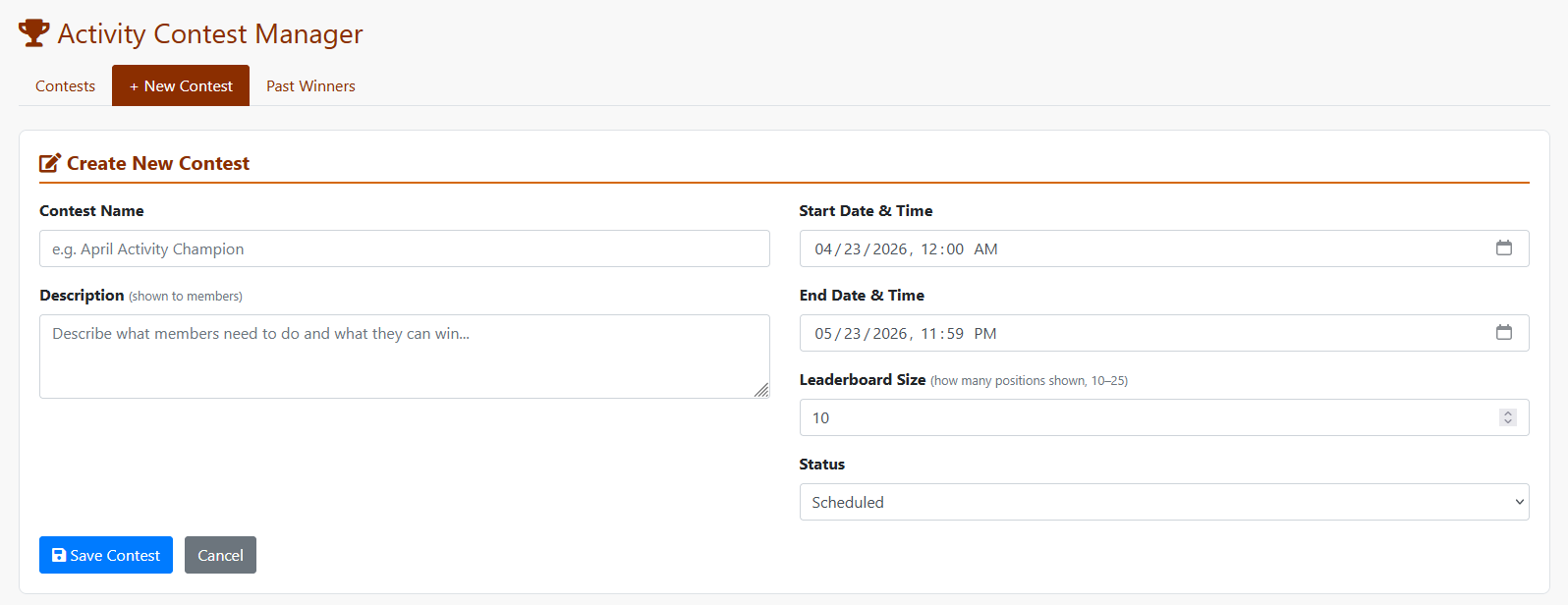
Create New Contest admin screen

Create a new contest - name, dates, leaderboard size, status

Contest prizes admin view

Rewards setup - add multiple rewards per rank, any combination

Everything you need, nothing you don't

📅
Any contest duration Day, week, month, quarter - set exact start and end datetime for each contest
🤖
Fully automated cron Daily cron auto-activates and auto-finalizes contests, distributing all rewards automatically
📊
Live leaderboard with gravatars Members see real-time rankings. Configure 10–25 positions. Countdown timer included.
🔁
Unlimited contests Run one after another. Each has its own AP settings, rewards, and leaderboard size
🏛️
Past winners archive Members can always see who won previous contests and what prizes they received
🔲
Square Banner plugin support Auto-detects if the Square Banner plugin is installed and adds it as a reward option
🔒
Anti-duplicate protection Login AP awarded once per day. Mail read AP once per message. Referral AP once per new member.
🎨
Neutral, theme-ready member page Professional blue/navy design that works on any LFMVM site. CSS fully scoped - no interference with your existing theme.
Web installer included Upload one file, open in browser - tables created, mods registered, menu added. Delete installer after.
🚫

Admin Exclusion List

Participating in your own contest? Running test accounts? Add any member IDs to the built-in Exclusion List and they are permanently removed from all leaderboards and prize calculations. Your own admin account, staff, test users - they earn no contest points and can never appear in rankings or win rewards. The list applies across all contests globally, and you can add or remove members at any time with a single click.

🔗

Leaderboard Macros

Want to show your live Top 5 or Top 10 leaders right on a splash page? Drop these macros into any splash page or sales page template and they are replaced with live data automatically:

Username
#APLEADER1#
through #APLEADER25#
Photo (Gravatar URL)
#APLEADERPHOTO1#
through #APLEADERPHOTO25#

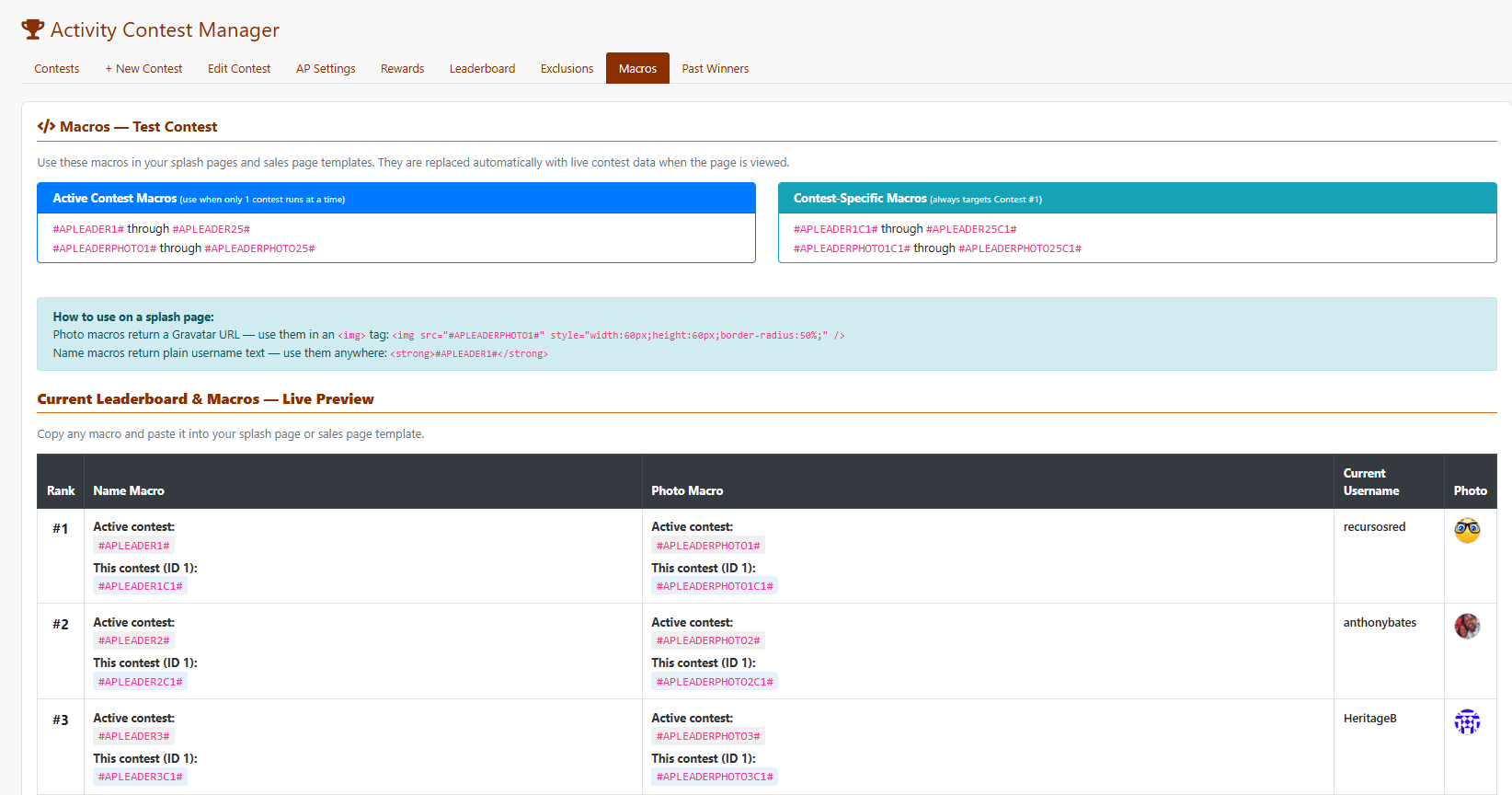
Running multiple contests? Contest-specific variants like #APLEADER1C2# always target a specific contest by ID. The admin panel includes a live Macros tab showing every macro name with real-time username and avatar preview.

Activity Contest Macros - live preview in admin panel

Admin Macros tab - live preview showing usernames and avatars for each rank

Up and running in minutes

Includes a web installer that does the heavy lifting. A full step-by-step guide is included with the download.

1
Upload ac_install.php to your site root

Just one file to upload. Via cPanel File Manager, FTP - whichever you prefer.

2
Open the installer in your browser

Visit yoursite.com/ac_install.php. It auto-detects your database, checks permissions, shows exactly what will happen, and installs everything in one click - creates 6 database tables, registers all hooks, adds the admin menu entry, and writes all mod files. Delete the installer after.

3
Add member page link to your navigation

Add a link to activity_contest.php in your member area navigation. Suggested label: Activity Contest or 🏆 Contests.

4
Create your first contest

Go to Admin → Ozonic Digital → Activity Contest. Create a contest, set AP values, add prizes, activate - done!

Ready to boost
member activity?

One-Time Purchase
$50
Need help with installation? Contact us!
  • Complete mod - all files included
  • Web installer for easy setup
  • Step-by-step installation guide
  • All future updates
  • Support via Ozonic Digital
🚀 Purchase via ingaozweb.com

Login or create an account at ingaozweb.com to purchase

Click anywhere or press Esc to close